
Mazda CX-5 Service & Repair Manual: Cooling System Cap Inspection
WARNING:
-
Never remove the cooling system cap or loosen the radiator drain plug while the engine is running, or when the engine and radiator are hot. Scalding engine coolant and steam may shoot out and cause serious injury. It may also damage the engine and cooling system.
-
Turn off the engine and wait until it is cool. Even then, be very careful when removing the cap. Wrap a thick cloth around it and slowly turn it counterclockwise to the first stop. Step back while the pressure escapes.
-
When you are sure all the pressure is gone, press down on the cap using the cloth, turn it, and remove it.
1. Clean the cooling system cap and the sealed part.
2. Inspect the cooling system cap for cracks or everted seal.
-
If there is any malfunction, replace the cooling system cap.
3. Attach the cooling system cap to the radiator cap tester.
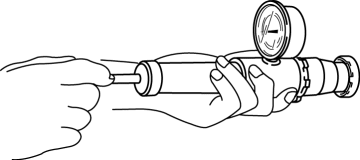
4. Hold the cooling system cap downward and apply pressure gradually. Verify that the pressure is held stable for 10 s.
-
If the pressure is not held stable, replace the cooling system cap.
-
Cooling system cap valve opening pressure
-
93.2—122.6 kPa {0.951—1.250 kgf/cm2, 13.6—17.7 psi}
 Cooling Fan Motor Removal/Installation
WARNING:
Never remove the cooling system cap or loosen the radiator drain plug while
the engine is running, or when the engine and radiator are hot. Scalding engine
coolant and steam may ...
 Cooling System Cap
Purpose, Function
The cooling system cap maintains appropriate pressure in the engine coolant
passage. In addition, cooling efficiency has been improved by increasing the
engine coolant b ...
Other materials:
Oil Seal (Coupling Component) Replacement
1. Drain the differential oil into a container.
2. Remove the coupling component..
3. Remove the oil seal from the differential carrier using a screwdriver or similar
tool.
4. Apply differential oil to the new oil seal lip.
5. Install the new oil seal to the differential carrier using the ...
Personalization Features
The following systems can be customized.
When performing a customized setting, refer to the referenced section for
the detailed setting procedure.
Security And Locks
NOTE:
There are two types of customization procedures; one using the M-MDS and
the other using the ...
Transfer Oil Seal Replacement [Fw6 Ax EL]
Transfer oil seal (LH)
1. Drain the transfer oil..
2. Remove the transfer from the vehicle..
3. Insert a tape-wrapped flathead screwdriver into the lip area of the oil seal
(LH) as shown in the figure and remove the oil seal (LH).
4. Using the SST and a hammer, tap the new seal into pla ...
