
Mazda CX-5 Service & Repair Manual: Front Door Speaker Removal/Installation
Without Bose®
NOTE:
-
If the procedure is performed while holding the front door speaker cone, it could deform the cone causing a malfunction. Therefore, perform the procedure while holding any part other than the cone.
1. Disconnect the negative battery cable..
2. Remove the following parts:
a. Inner garnish.
b. Front door trim.
3. Disconnect the connector.
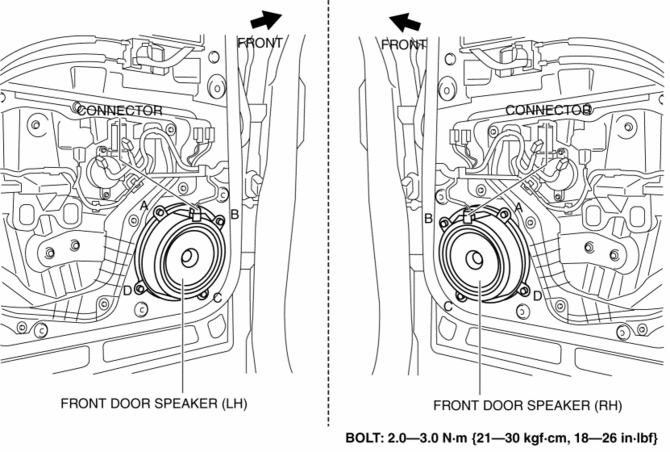
4. Remove the bolts in alphabetical order.
5. Pull the front door speaker in the direction of the arrow shown in the figure and remove it while detaching the pins.

6. Install in the reverse order of removal.
With Bose®
1. Disconnect the negative battery cable..
2. Remove the following parts:
a. Inner garnish.
b. Front door trim.
3. Disconnect the connector.

4. Remove the bolts in alphabetical order.
5. Pull the front door speaker in the direction of the arrow shown in the figure and remove it while detaching the pins.

6. Remove the screws.

7. Remove the front door speaker from the bracket.
8. Install in the reverse order of removal.
 Front Door Speaker Inspection
1. Disconnect the negative battery cable..
2. Remove the following parts:
a. Inner garnish.
b. Front door trim.
3. Disconnect the front door speaker connector..
4. Verify that the resistance ...
 Glass Antenna
Purpose, Function
The RDS (Radio Data System) converts radio broadcast waves to electric signals
and sends the signals to the audio unit.
Construction
An antenna with excellent ...
Other materials:
Starter Interlock Switch [Skyactiv G 2.0]
Purpose, Function
The starter interlock switch mechanism prevents vehicle surge when the engine
is started, enhancing safety. The engine cannot be started unless the clutch
is depressed.
Construction
The mechanism is provided with a starter interlock switch on the circuit
...
Parking Brake Lever Removal/Installation
1. Remove the front console box..
2. Remove the shift lever knob. (MTX).
3. Remove the shift panel..
4. Remove the upper panel..
5. Remove in the order indicated in the table.
6. Install in the reverse order of removal.
7. After installation, inspect the parking brake lever stroke..
...
Manual Transaxle Shift Mechanism Removal/Installation [C66 M R]
1. Disconnect the negative battery cable..
2. Remove the shift lever using the following procedure:
a. Remove the upper panel..
b. Remove the shift lever knob.
c. Remove the shift panel..
d. Remove the side wall..
e. Remove the rear console..
f. Press the tabs on the control cable ...
