
Mazda CX-5 Service & Repair Manual: Keyless Warning Alarm
Purpose
-
The keyless warning alarm notifies the driver that the remote transmitter cannot be verified or the steering lock cannot be released.
Function
-
When the instrument cluster receives the keyless warning alarm request signal sent from the start stop unit via the CAN signal, the keyless warning alarm sounds.
-
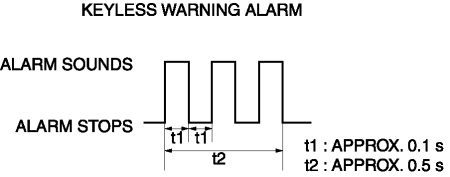
The keyless warning alarm sound pattern is as shown in the figure. For the conditions that the alarm for each pattern sounds, refer to KEYLESS ENTRY SYSTEM (without advanced keyless entry system)/ADVANCED KEYLESS ENTRY SYSTEM (with advanced keyless entry system).
Pattern A

Pattern B

Pattern C
Construction
-
The keyless warning alarm sounds using the buzzer built into the instrument cluster.
Operation
1. The instrument cluster receives (1) the keyless warning alarm request signal from the start stop unit.
2. The instrument cluster microcomputer turns the transistor on (2) based on the keyless warning alarm request signal.
3. When the transistor turns on, the ground circuit of the alarm is established and the alarm sounds (3).

Fail-safe
-
Function not equipped.
 Keyless Beeper Removal/Installation
1. Disconnect the negative battery cable..
2. Remove the cowl grille..
3. Disconnect the connector.
4. Pull the keyless buzzer in the direction of the arrow (2) shown in the figure
while p ...

Other materials:
Filament Repair
1. Clean the filament using isopropyl alcohol.
2. Attach tape to both sides of the filament.
3. Using a small brush or marking pen, apply silver paint.
4. After 2—3 min, carefully remove the tape without damaging the applied
area.
CAUTION:
Do not operate the rear window defro ...
Front Seat Cushion Trim Removal/Installation
WARNING:
Handling a side air bag improperly can accidentally operate (deploy) the
air bag, which may seriously injure you. Read the service warnings/cautions
in the Workshop Manual before handling the front seat (side air bag integrated)..
If the sliding mechanisms on both side ...
Rear Differential Disassembly
WARNING:
The engine stand is equipped with a self-lock mechanism, however, if the
rear differential is in a tilted condition, the self-lock mechanism could become
inoperative. If the rear differential unexpectedly rotates it could cause injury,
therefore do not maintain the rear dif ...
