
Mazda CX-5 Service & Repair Manual: Repairable Range Of Polypropylene Bumpers [Plastic Body Parts]
The three types of damaged bumpers shown below are considered repairable. Although a bumper which has been damaged greater than this could also be repaired, it should be replaced with a new one because such repair would detract from the looks and quality of the bumper. In addition, such repair is not considered reasonable in terms of work time.
Repairable Bumpers
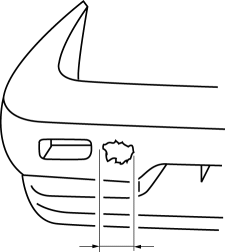
1. A bumper with a hole less than 50 mm {1.97 in} in diameter.
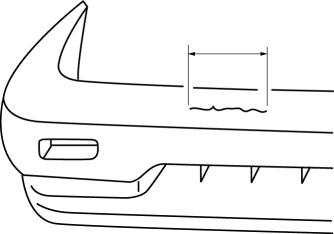
2. A bumper with a crack less than 100 mm {3.94 in} in length.
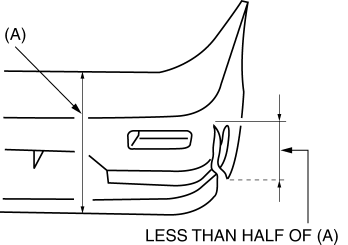
3. A bumper with a crack less than 100 mm {3.94 in} in length that is less than half of the width of the bumper.
 Rear Scuff Plate Removal/Installation
1. Take the shaded area shown in the figure, detach tab A while pulling the rear
scuff plate in the direction of the arrow (1) shown in the figure, then detach hook
B, clips C, pins D while pullin ...
 Shift Panel Removal/Installation
ATX
1. Disconnect the negative battery cable..
2. Selector lever to neutral position.
3. Remove the front console box..
4. Take the shaded area shown in the figure, and remove the shift panel i ...
Other materials:
Oil Strainer
Purpose, Function
The oil strainer suctions the engine oil in the oil pan using the oil pump
vacuum. The engine oil is filtered by the internal filter at that time.
Construction
The oil strainer is installed on the suction port of the oil pump.
The oil strain ...
Canister Vent (Cv) Solenoid Valve
U.S.A. And CANADA
Purpose, function
Seals the atmosphere side of the charcoal canister during EVAP leak check
monitoring.
Construction
Included in the charcoal canister.
The CV solenoid valve is consists of O-rings.
Operation
According to the ...
Installing Child-Restraint Systems
Accident statistics reveal that a child is safer in the rear seat. The front
passenger's seat is clearly the worst choice for any child under 12, and with rear-facing
childrestraint systems it is clearly unsafe due to air bags.
NOTE
Even if your vehicle is equipped with front passenger sea ...
