
Mazda CX-5 Service & Repair Manual: D Pillar Reinforcement (Lower) Installation [Panel Replacement]
Symbol Mark

Installation Procedure
1. When installing new parts, measure and adjust the body as necessary to conform with standard dimensions.
2. Drill holes for the plug welding before installing the new parts.
3. After temporarily installing new parts, make sure the related parts fit properly.
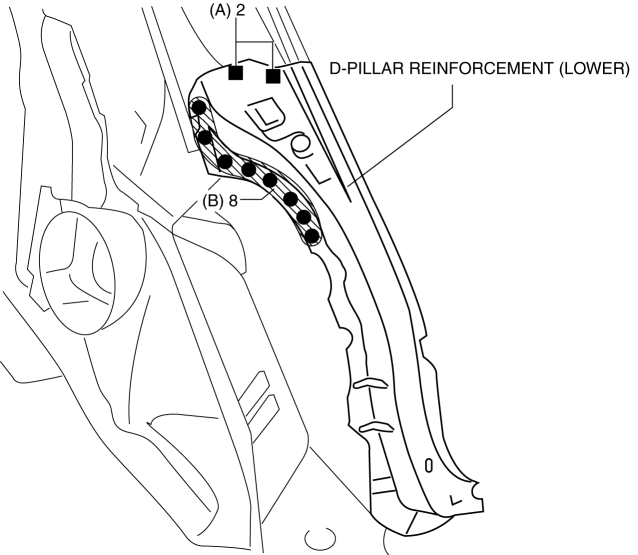
4. Plug weld the 2 locations indicated by (A) shown in the figure.
5. Spot weld the 8 locations indicated by (B) shown in the figure, then install the D-pillar reinforcement (lower).
 Cowl Upper Plate Removal [Panel Replacement]
Symbol Mark
Removal Procedure
1. Drill the 9 locations indicated by (A) shown in the figure.
2. Drill the 2 locations by (B) from the front wheel housing side shown in the
figure.
3. Drill ...
 D Pillar Reinforcement (Lower) Removal [Panel Replacement]
Symbol Mark
Removal Procedure
1. Drill the 8 locations shown in the figure.
2. Remove the D-pillar reinforcement (lower). ...
Other materials:
Engine Oil Pressure Warning Light
Purpose
The engine oil pressure warning light warns the driver that the engine oil
level is insufficient.
Function
When the instrument cluster receives the engine oil pressure warning light
request signal sent from the PCM via the CAN signal, it illuminates the engine
oi ...
Blind Spot Monitoring (Bsm) Off Indicator Light
Purpose
The BSM OFF indicator light informs the driver that the Blind Spot Monitoring
(BSM) system is turned off or there is a malfunction in the system.
Function
The instrument cluster illuminates the BSM OFF indicator light based on the
BSM system off signal sent via a CA ...
Oil Pump [Skyactiv G 2.0]
Outline
The oil pump has a mechanism for feedback control of oil pressure. As a result,
an oil pressure increase of more than the set pressure is suppressed and oil
pump drive resistance is reduced. In addition, because the set pressure can
be changed (oil pressure two-step control) ...
