
Mazda CX-5 Service & Repair Manual: Pre Tensioner Seat Belt [Two Step Deployment Control System]
Purpose
-
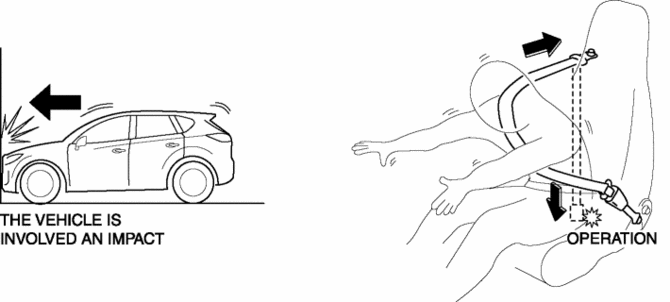
The pre-tensioner seat belt retracts and tightens the seat belt webbing to protect the front passengers during a collision.
Function
-
The pre-tensioner seat belts operate (deploy) based on the operation signal from the SAS control module to instantly retract and tighten the belt webbing, restraining the driver and front passenger.
Construction
-
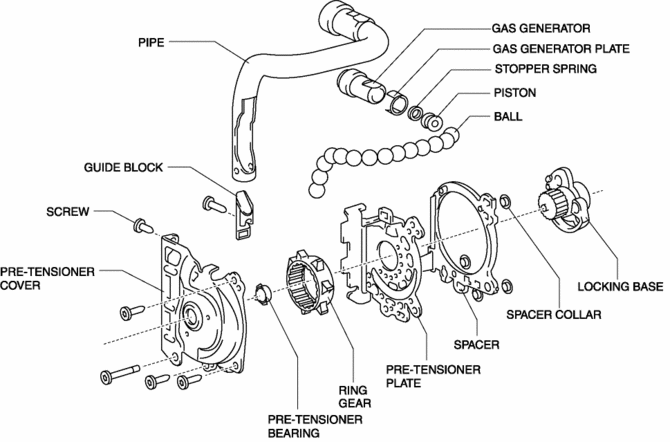
The pre-tensioner seat belt is installed to the front seat belt retractor.
-
The pre-tensioner seat belt consists of the following parts shown in the figure:
Operation
Normal operation (pre-tensioner non-operation)
-
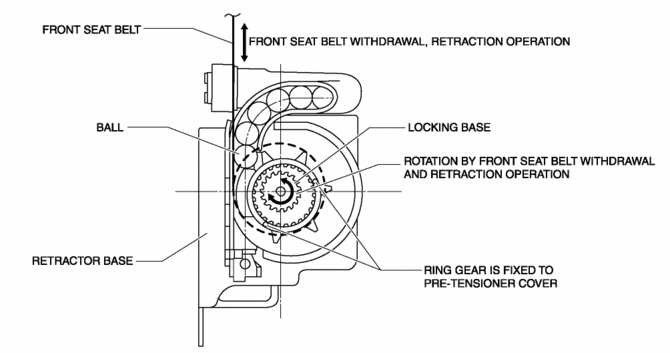
Normally, there is a gap between the locking base and the ring gear.
-
The ring gear rotates in conjunction with the withdrawal and retraction of the front seat belts, however, in the pre-tensioner part it is kept separated.
Pre-tensioner activation
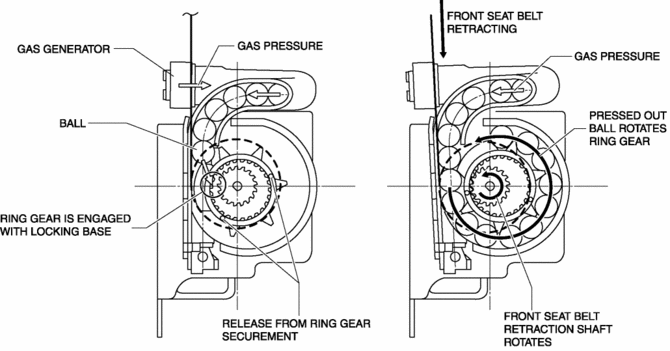
1. The gas generator produces gas when it receives an operation signal from the SAS control module.
2. The ball in the cylinder is pressed by the gas pressure and the ring gear is removed from its securement.
3. The ring gear is engaged with the locking base and the force of the ball being pressed out is transmitted to the retraction shaft.
4. The front seat belt is retracted in conjunction with the rotation of the retraction shaft.
Fail-safe
-
Function not equipped.
 Pre Tensioner Seat Belt [Standard Deployment Control System]
Purpose
The pre-tensioner seat belt retracts and tightens the seat belt webbing to
protect the front passengers during a collision.
Function
The pre-tensioner seat belts operate ...
 Pressure Sensor Removal/Installation [Two Step Deployment Control System]
WARNING:
Handling the pressure sensor improperly can accidentally operate (deploy)
the air bag module, which may seriously injure you. Read the air bag system
service warnings and cautio ...
Other materials:
Non Return Valve
Purpose, Function
Assures safety by preventing fuel from returning to the fuel filler opening.
Construction
The non-return valve cannot be removed as it is installed inside the fuel
tank.
2WD
AWD
A single valve type has been adopted for the non-return v ...
Tiedown Hooks
CAUTION
Do not use the front and rear tiedown eyelets for towing the vehicle.
They have been designed only for securing the vehicle to a transport vessel during
shipping.
Using the eyelets for any other purpose could result in the vehicle being damaged.
Tiedown Hooks
1. Remove the tiedown eye ...
Back Up Light Switch Removal/Installation [C66 M R]
1. Disconnect the negative battery cable..
2. Remove the front under cover No.2..
3. Remove in the order indicated in the table.
4. Install in the reverse order of removal.
1
Back-up light switch connector
2
Back-up light switch
...
